A small robot that lives inside Expenity. Tell it what you are dreaming about, a trip, new shoes, a car, a gift. It looks at your wallets, your income, your bills and the way you really spend, and tells you, kindly and with a joke, whether you can afford it, and when.
Part of the Advanced plan. Turn it on in More → Features.
Go on, tap the robot. Then tap it a lot.
Insert tape
Talk to eFriend. For real.
He is a rule-based 80s bot (born 1984, no AI, no cloud) who lives on cassettes and Nixie tubes. This is the real chat from the app, with a made-up household called Danae. Press play and tell him what you want to buy. Nothing is saved.
Tape counter
💡Try: “a new watch for my girlfriend, 450, in 2 weeks”.
✏️Then correct him: “no, it is 900”.
🕺Ask him: “how old are you?” or “do you like disco?”.
🧹The broom starts over, the clock opens past chats, and after five minutes he falls asleep.
verdicts
months of best days
chats kept
minutes a chat
ideas
questions to ask him
AI
🔒
Everything stays on your deviceeFriend does its sums right inside your phone. No account needed, nothing sent anywhere.
🏦
No real money ever movesExpenity is a tracking system. eFriend only ever updates your records, never your bank.
🤝
It advises. You decide.It never drops a plan, never spends for you, and never does more than you allowed.
In one minute
Three things happen. That’s it.
No spreadsheets, no formulas, no guessing. You tell eFriend what you want. It does the thinking.
💭
You dream
A trip to Paris, fancy new shoes, a new phone, a gift for someone you love, even a car. Give it a cost and a date. That’s a plan.
✈️ A trip👟 Shoes📱 Phone🎁 A gift🚗 A car
🔍
It looks
At what is in your wallets, the salary on its way, the bills you must pay, and how you actually spend, learned from your own history. Not an average person. You.
🏦 Wallets💶 Income🧾 Bills📊 Habits
🗣️
It tells you
With a face, a verdict and a joke. And if the answer is “not yet”, it works out the earliest date that would be safe.
ComfortableOn trackTightAt riskUnlikely
How it thinks
The question is never “do I have the money?”
It is “what will I have left after buying it, and is that enough for next month?” Here is the idea, with the car example everyone asks about.
🏦 In your wallets+ €10,000
🚗 The car you want− €9,000
🛟 Left after buying€1,000
🗓️ Your usual month€700
€1,000 is 1.4 months of your spending. With your salary on the way, next month stays positive. On track.
That is the whole trick. eFriend adds up what you have and what is coming, takes away the bills and the spending it has learned from your own history, and looks at what remains after the purchase.
🛟It measures the leftover in months of your usual spending, because “€300” means nothing until you know what a month costs you.
💶It checks your income too. €1,000 left is fine if a salary lands next week, and risky if it doesn’t.
🔥It also checks whether you spend more than you earn. Then it measures how long the leftover lasts at your real monthly loss, so a plan never looks comfortable on a salary that does not cover your life.
📈The longer you use Expenity, the sharper it gets. It tells you how many days of history it has, and how sure it is.
Try it yourself
Play with the real rule.
Move the sliders. This uses the same logic as the app, just with your imagination instead of your data. Watch the handle change colour as you ask for more safety.
Real life
Four people. Four very normal questions.
🚗
Danae and the car
“Can I just buy it?”
Danae has €10,000 in the bank, earns €1,900 a month, spends about €700 and wants a car that costs €9,000. On paper she can. But what happens in the weeks after?
€0left after buying
1.4months of spending
On tracksalary covers next month
Yes, you can. You would keep about a month and a half of spending, and your salary arrives before the next rent. I would not go below that cushion, though. 😉
👟
Nikos and the shoes
“Is it silly to ask for a small thing?”
Nikos set a plan: fancy shoes, €180, in three weeks. He forgot about it. On the day, Expenity checks again and gives him a green light.
€0cost
Safecushion intact
🎉one tap to record it
Today is the day. You can afford them and your cushion stays untouched. Did you make it? Tap yes and I will add it to your expenses with my little badge.
✈️
Elena’s Paris
“I always wanted to go there.”
Elena wants Paris in ten weeks. The honest answer is At risk. Instead of leaving her stuck, eFriend suggests a budget for her biggest “wants”, spots the subscription she forgot, and offers the earliest date that would be safe.
At riskfor the date she picked
🎯2 budgets suggested
📅earliest safe date
Paris is possible, just not by that date. A monthly Leisure budget of about €160 would add roughly €210 by then, and the earliest safe date is two weeks later. Want to use it?
👨👩👧
The Papadopoulos family
“We want everything. We cannot have everything.”
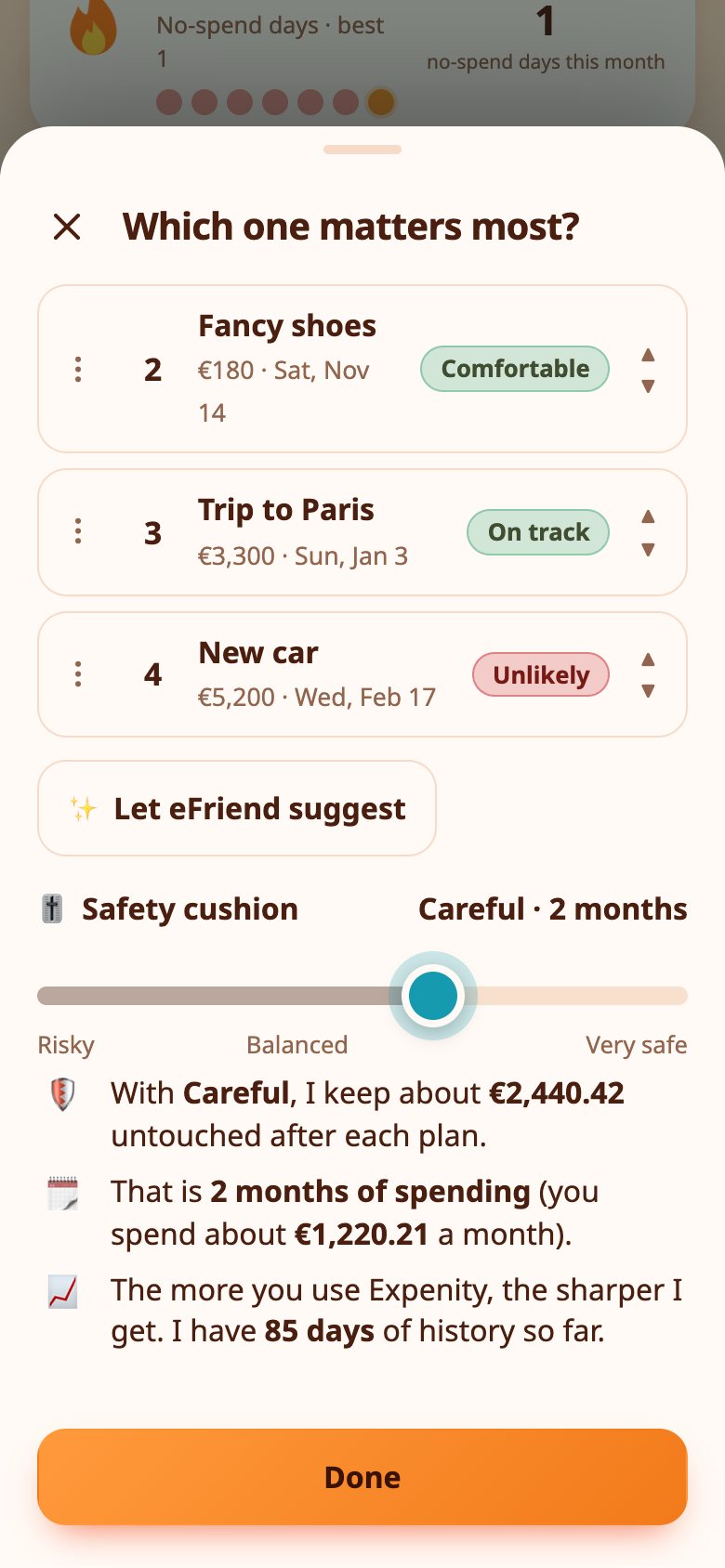
A gift in two weeks, shoes, a family trip and a new car. Together they cost more than the family will have. eFriend asks once: “Which one matters most?” They drag the plans into their order.
🏆the trip comes first
✅ ⚠️ ❌safe, at risk, doesn’t fit
💡“drop the car, the trip is safe”
The trip is your top priority out of the four, and it fits safely. The gift and shoes fit too. The car doesn’t, yet. I would never drop it for you, but moving it later would help.
Everything it can do
Twenty-two tracks, with the real screens.
Every picture below is a real screen from Expenity, with a made-up household called Danae. Nothing is mocked up.
1Plans, not savings goals
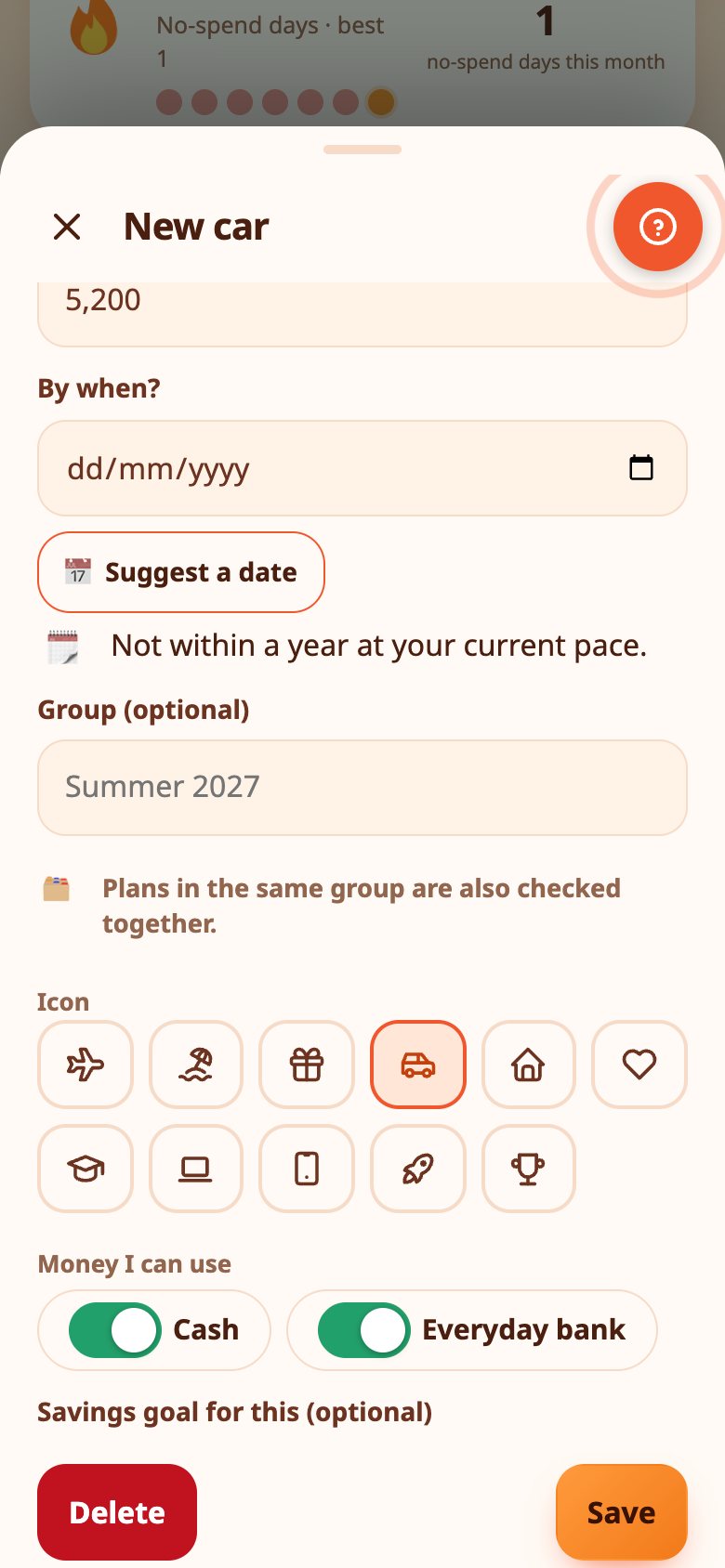
A plan is something to check, not a pot to fill. You give it a name, a cost, a date and the wallets it may use. You never have to “add money” to it. eFriend simply watches whether you will be able to afford it.
🔗Optional: link a savings goal and eFriend counts what is already saved there.
🔄Or turn an existing goal into a plan with Let eFriend manage this goal. Money already in it keeps counting.
🤖Every goal also has an Ask eFriend button, to check it without changing it.
2A verdict you can read in two seconds
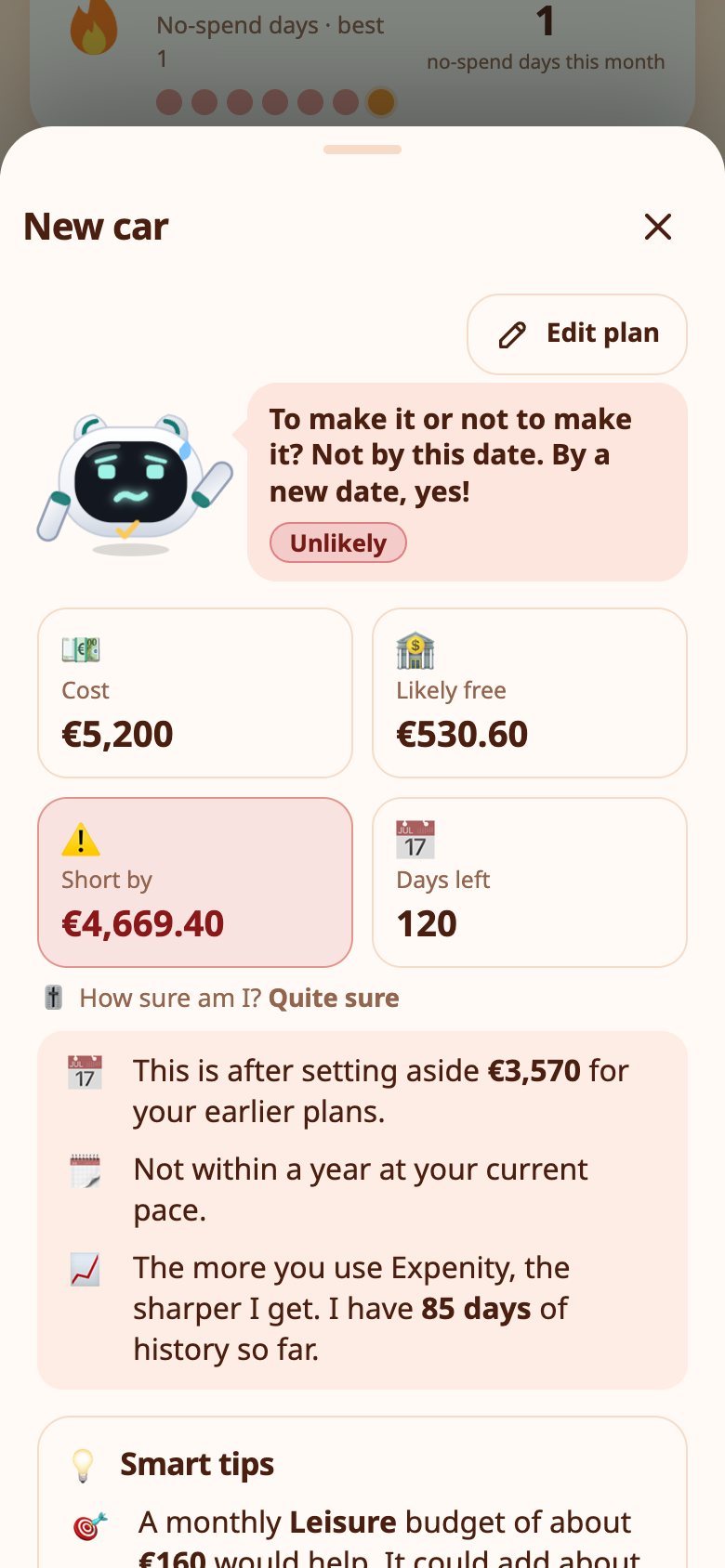
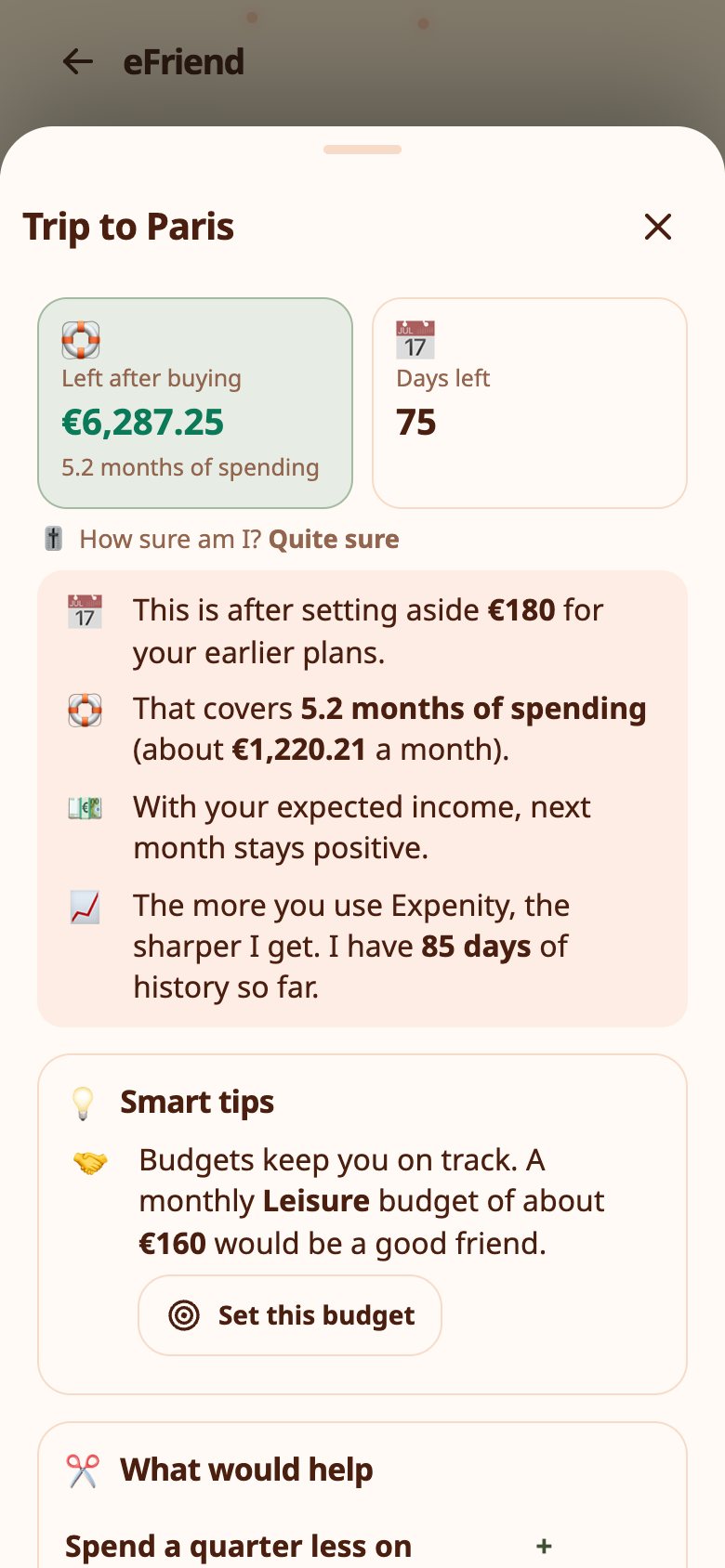
Each plan gets a face and one of five verdicts, Comfortable, On track, Tight, At risk or Unlikely. Tap Full analysis for the detail.
💶Four tiles: cost, likely free, left after buying, days left.
🛟How many months of spending that leftover covers.
🧾Bills that cannot be skipped, with the reason each one cannot.
🎚️How sure it is, and how many days of your history it has.
3Honest when you spend more than you earn
A verdict should never flatter you. If your spending is higher than your income, a one-month check is not enough: you are losing money every month. So eFriend looks at how long what is left would last at your real monthly loss, and says it plainly: “You spend about €1,200 a month more than you earn. What is left would last about 1.3 months.”
🔥The monthly shortfall is shown in the analysis, with how long the leftover lasts.
🟢A plan can only be Comfortable if what is left lasts 6 months or more and your cushion is intact.
🟡On track needs 3 months or more. Tight needs 1 month. Less than that is At risk.
✅If your income covers your spending, nothing changes.
4It sorts your spending: Must, Need, Want
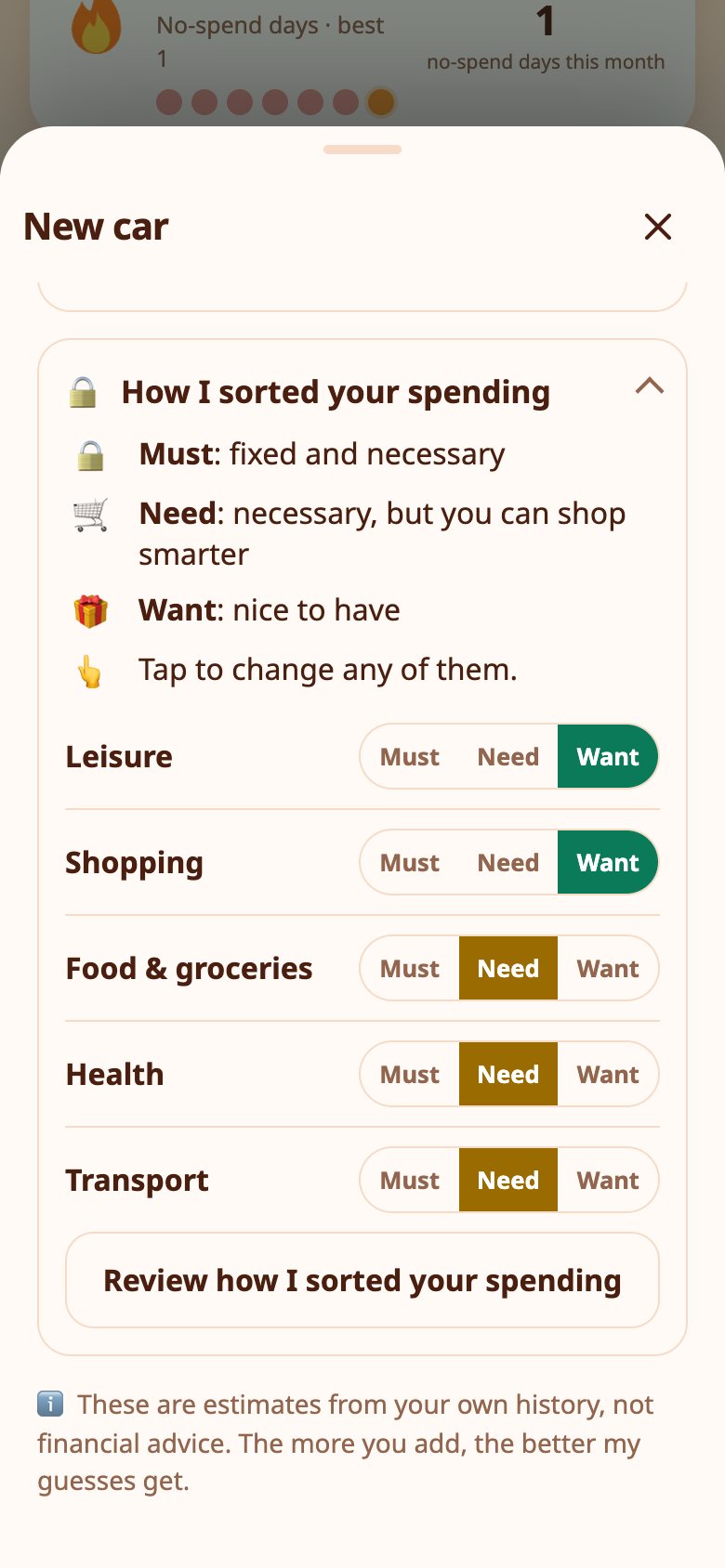
Rent and your phone bill are not “skippable”. A streaming plan is. eFriend sorts every category for you using a bit of common sense, then asks you to correct it. Is a doctor a need or a want? Only you know. A three-way toggle changes it in a tap, and the analysis updates instantly.
🔒Must: fixed and necessary.
🛒Need: necessary, but you can shop smarter.
🎁Want: nice to have.
5Budgets are its best friend
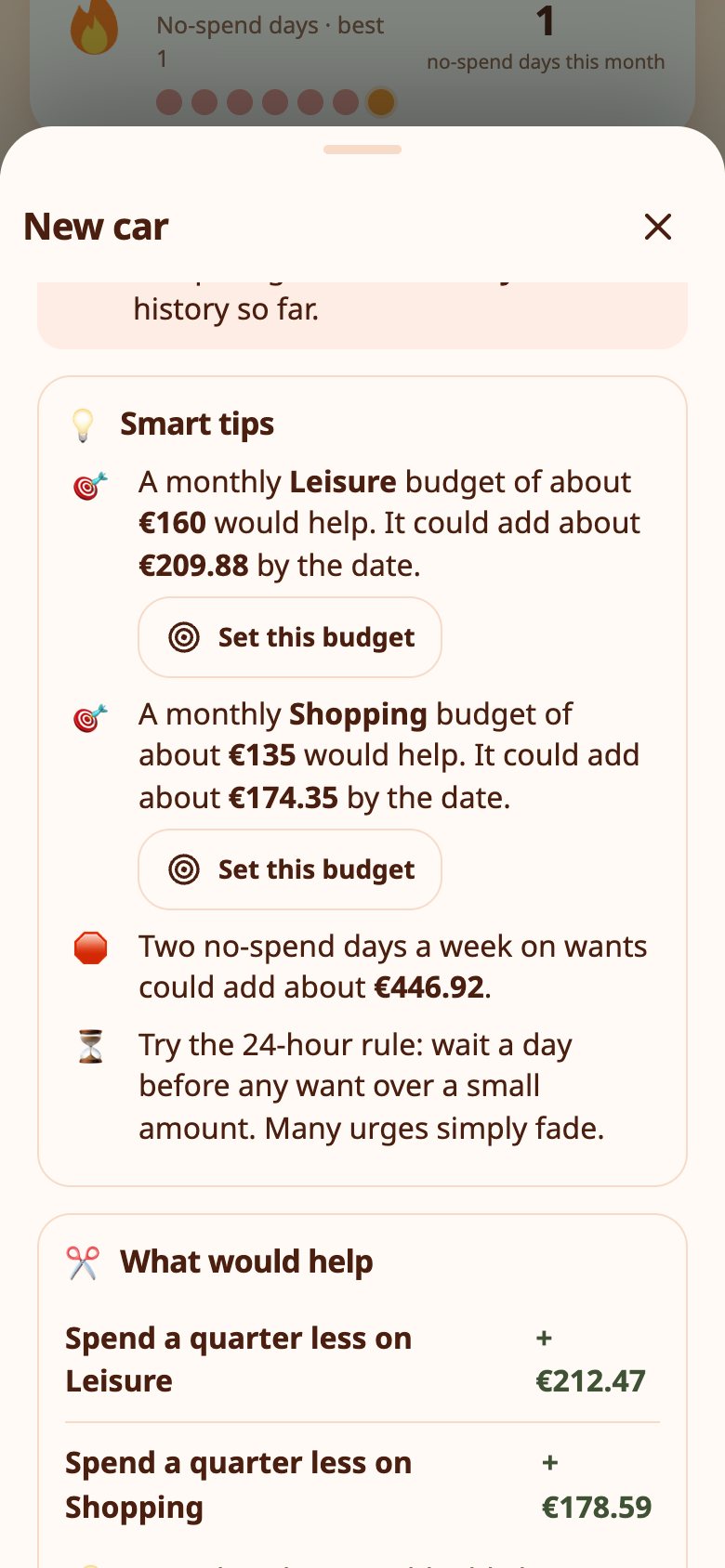
When a plan is off target, eFriend does not just worry. It proposes monthly budgets for the categories that cost you the most, tells you how much each could add by the date, and opens the budget form already filled in with Set this budget.
🎯“A monthly Leisure budget of about €160 could add about €210.”
🛑Two no-spend days a week, and the 24-hour rule for impulse wants.
✂️A quarter off the biggest wants, or pausing a subscription, with the exact gain.
6Many wishes, one priority list
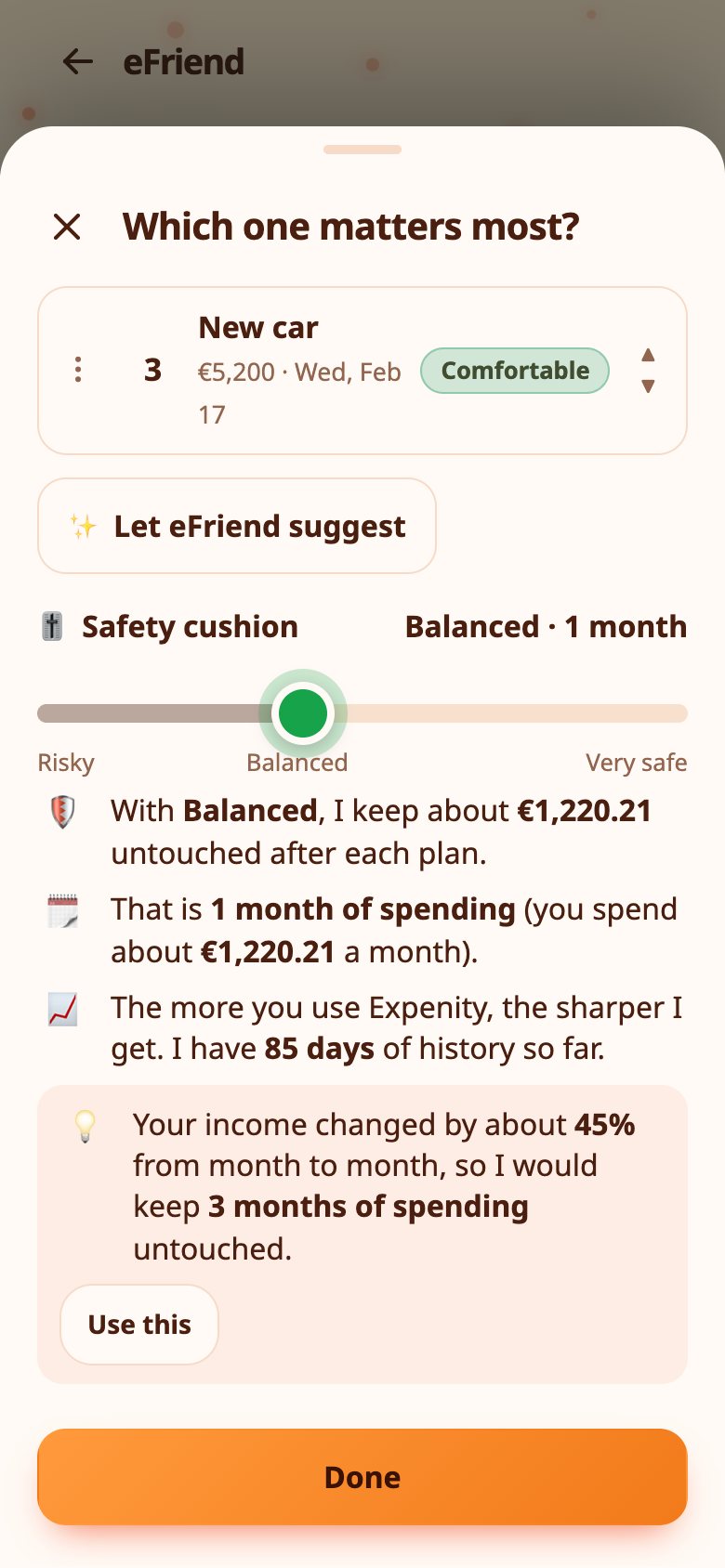
Give it as many plans as you like. When together they cost more than you will have, eFriend asks once: “Which one matters most?” You press and hold, then drag the plans into your order. The top one gets your money first.
🏆“Trip to Paris is your top priority out of the 4.”
✅Safe, fits, at risk, doesn’t fit, each plan placed honestly.
💡“If you drop New car, Paris would fit.”
✨Or tap Let eFriend suggest: cheapest first, so the most plans can happen.
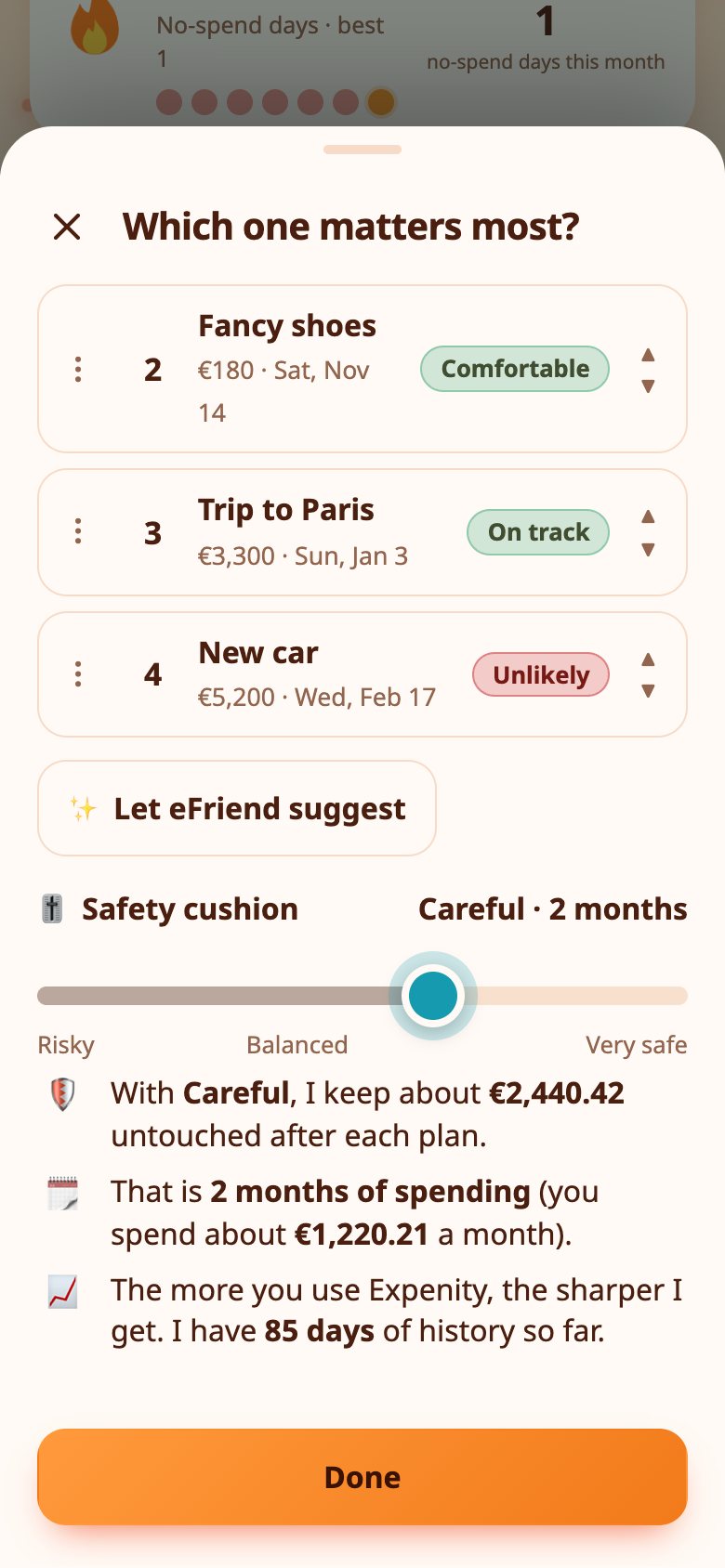
7Your safety cushion, your risk
How much should still be left after you buy something? Half a month? Three? You decide with one slider. The track stays calm. Only the handle changes colour, blending smoothly from red through green to blue.
🔴Risky: you are happy to spend almost everything.
🟢Balanced: one month of your usual spending stays untouched.
🔵Very safe: six months, a proper emergency fund.
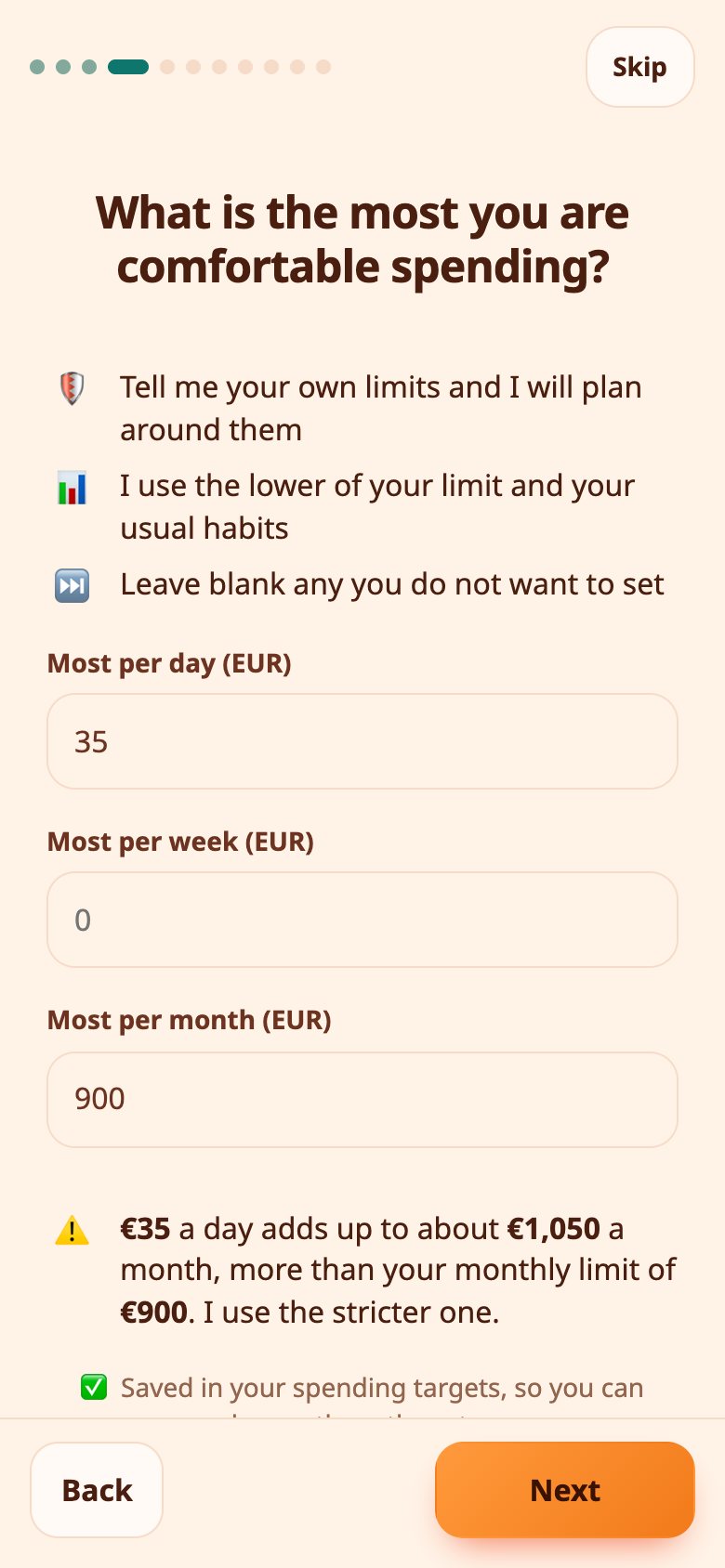
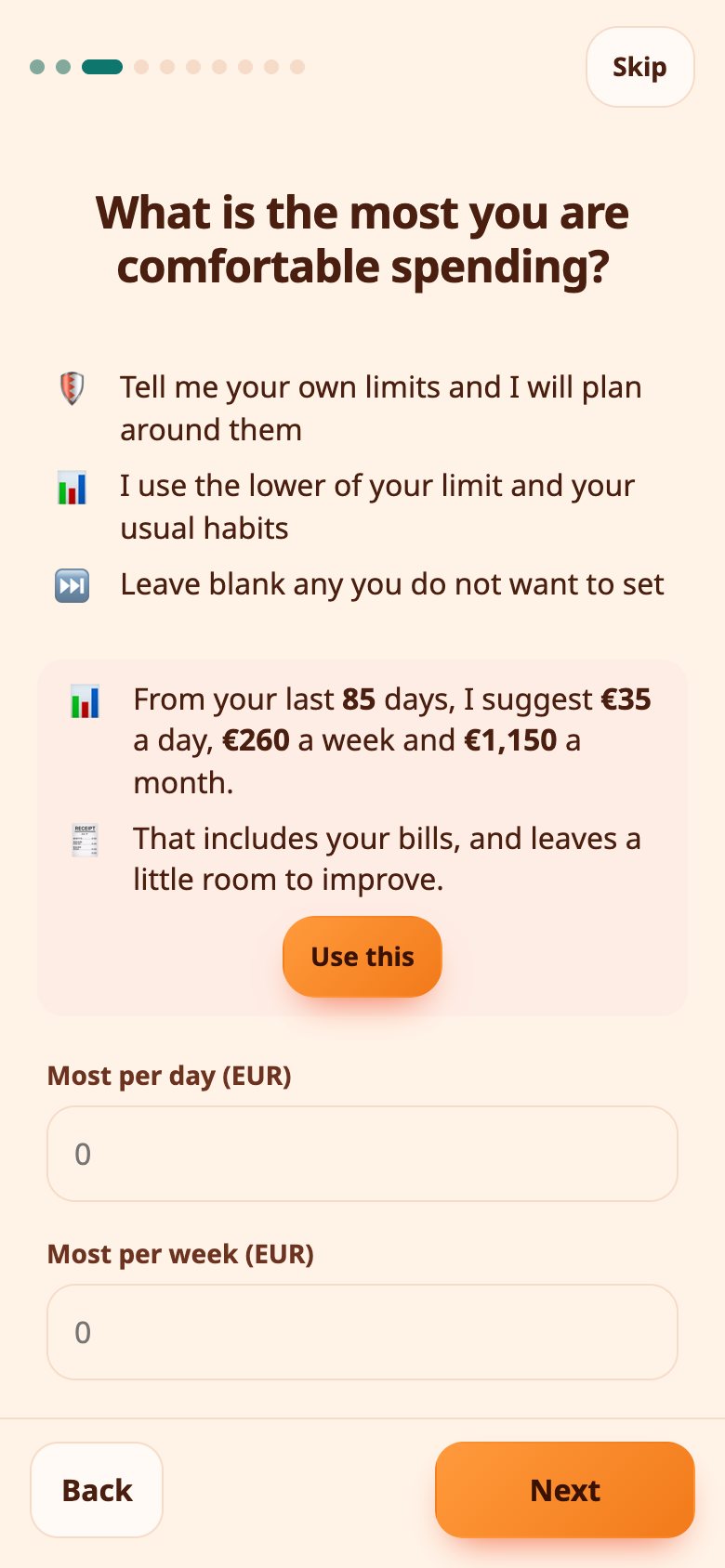
8Your own limits, respected
“What is the most you are comfortable spending?” Set a maximum per day, per week and per month, in the tour or in your spending targets. eFriend plans around the lower of your limit and your real habits. And if your limits don’t line up (€40 a day is about €1,200 a month, but your monthly limit is €900) it tells you and uses the stricter one.
9The earliest safe date
For bigger amounts, the question is not only “can I?” but “when?”. eFriend looks up to a year ahead and finds the first date you could buy it safely. If it is further away than a year, it says so honestly.
📅Suggest a date right inside the plan form.
👆Use this date in the analysis, and the plan moves, with the change recorded.
🔔Offered again on the day itself, if you cannot afford it yet.
10It can help with your savings goals
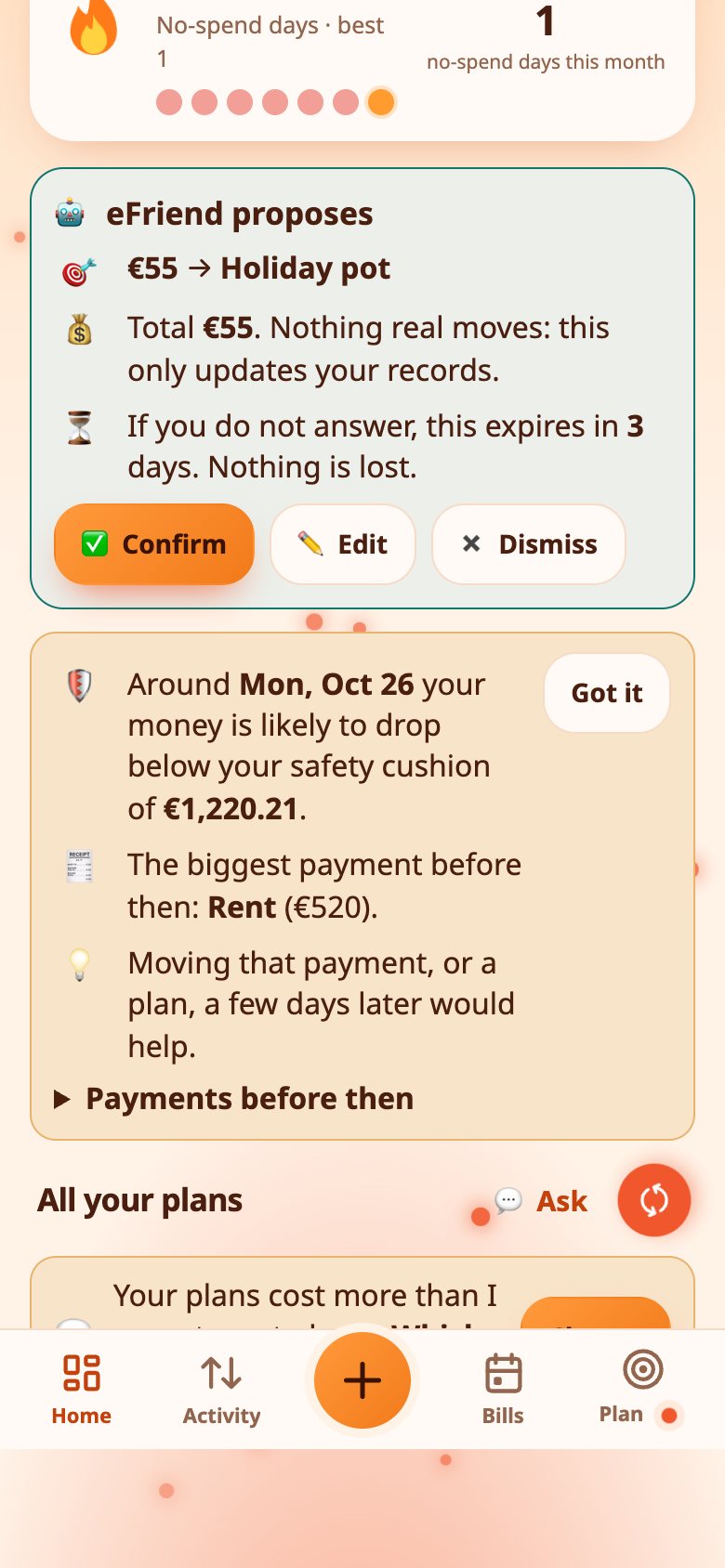
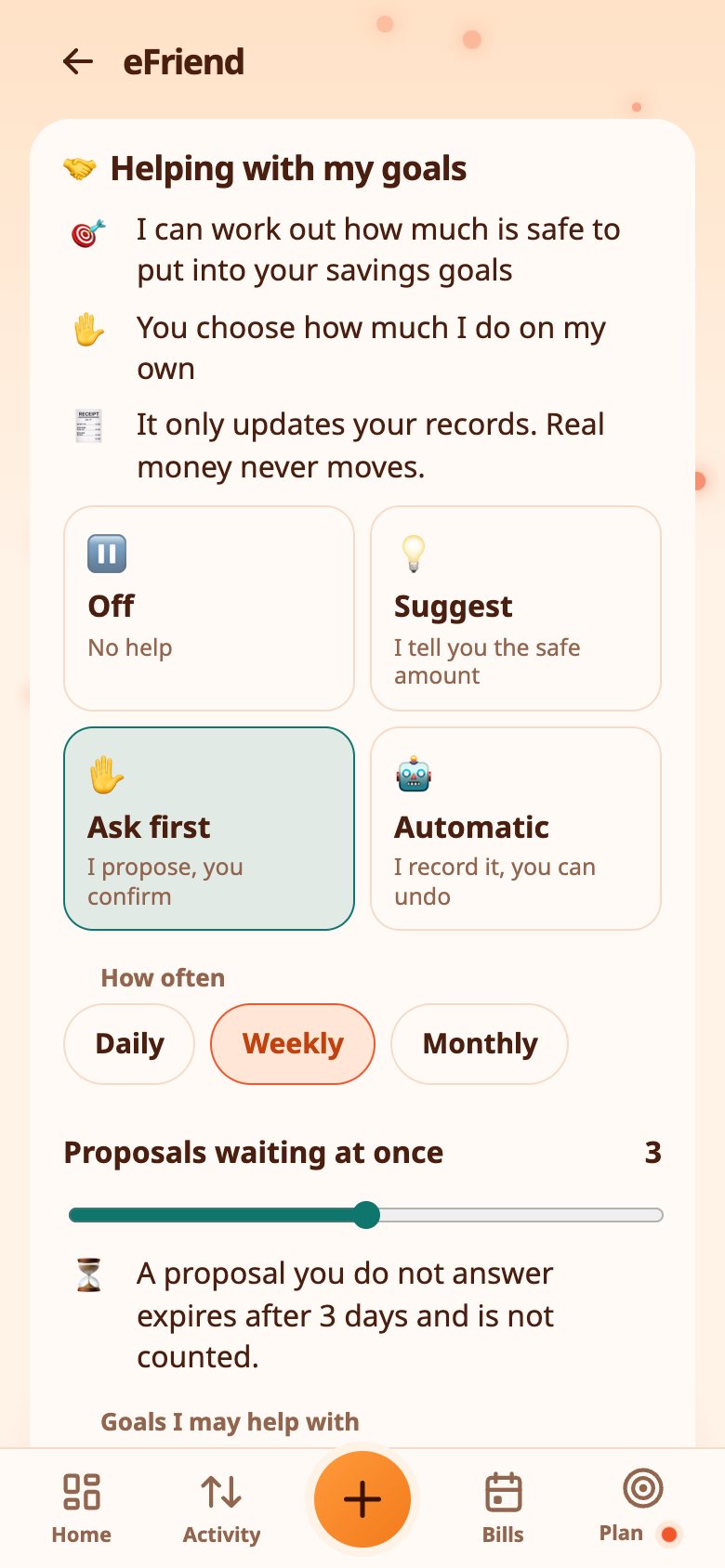
Under More → eFriend → Helping with my goals, you choose how much it does on its own. Nothing real moves. It only updates your records.
⏸️
Off
No help. The default.
💡
Suggest
“You can safely put about €60 in the Holiday pot.”
✋
Ask first
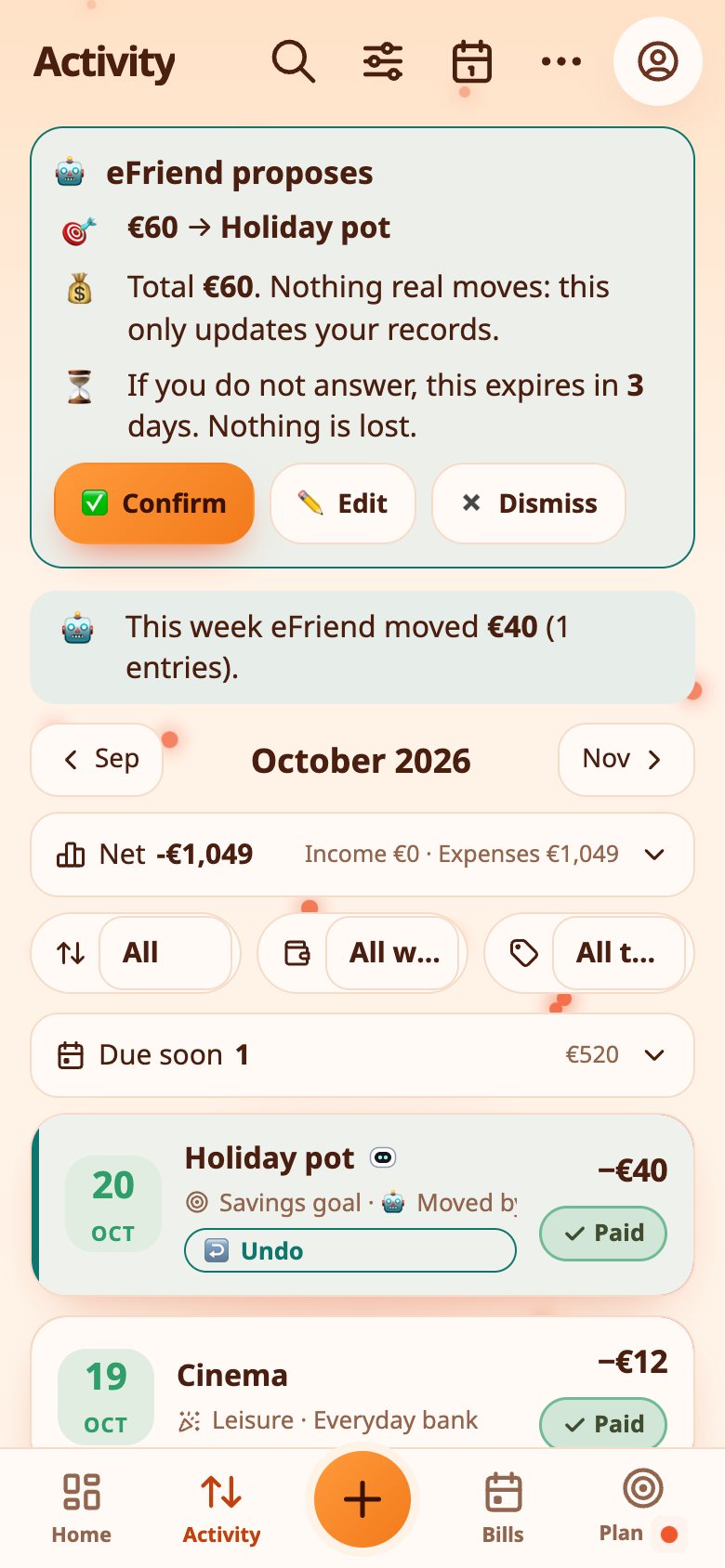
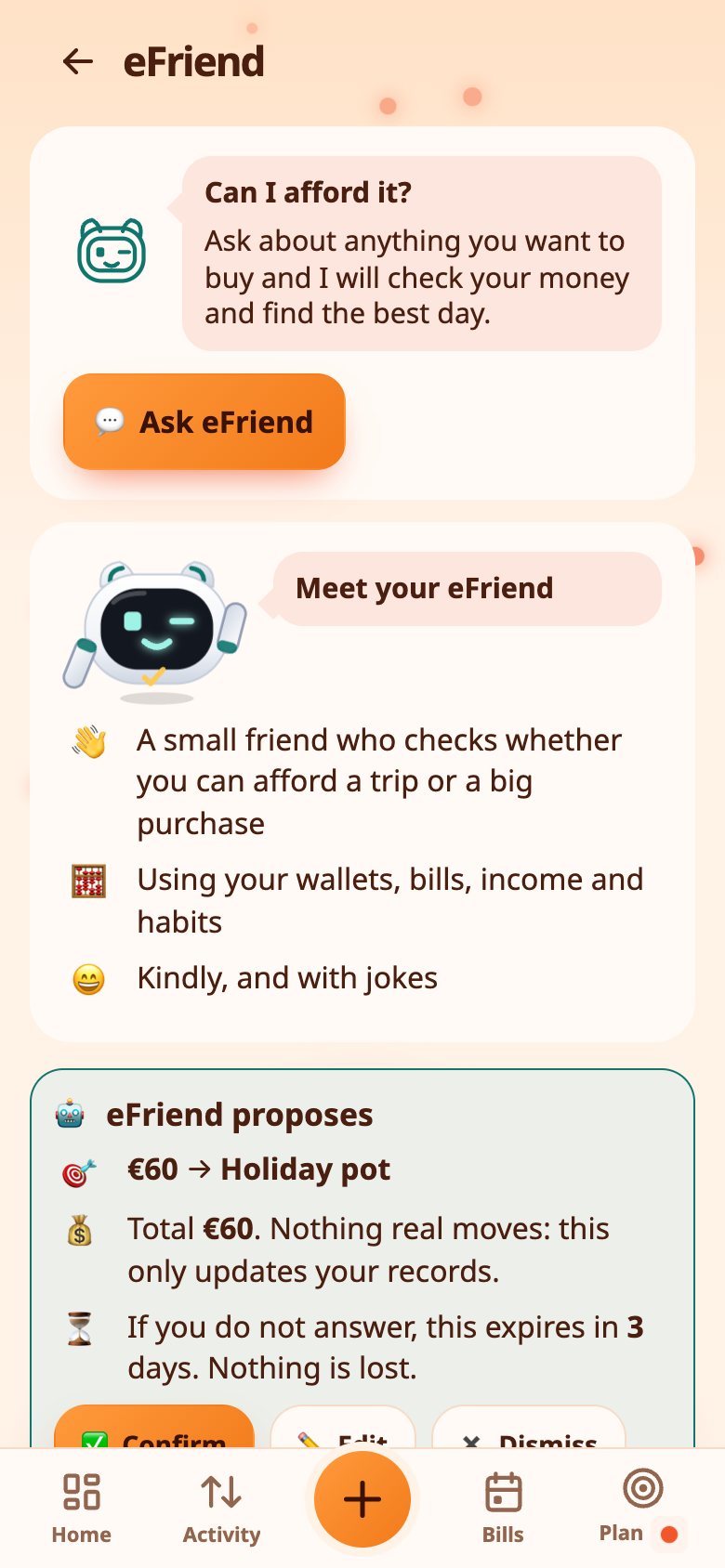
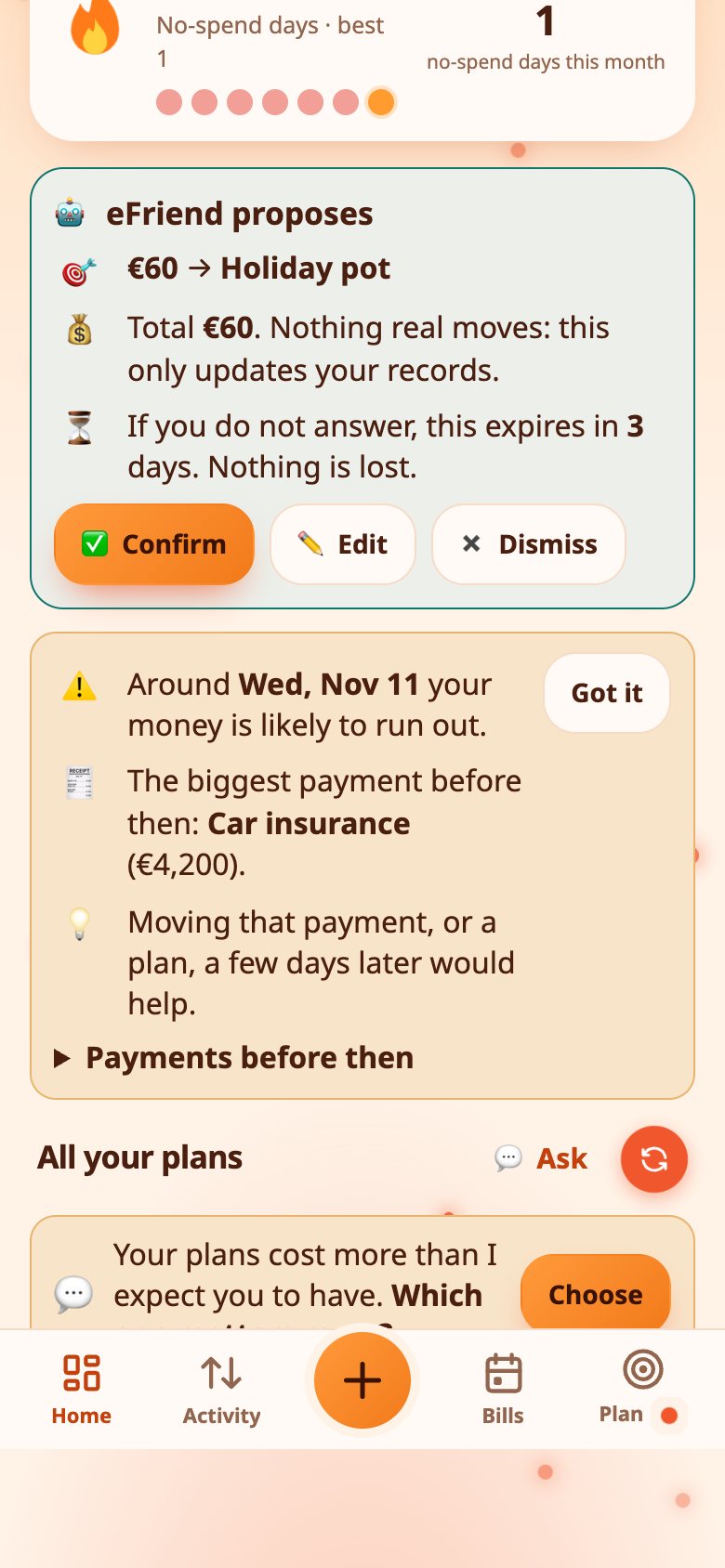
It proposes. You Confirm, Edit or Dismiss.
🤖
Automatic
It records it. Every entry has Undo.
You choose the pace. It respects it.
🗓️Daily, weekly or monthly, your pick.
🎚️Between 1 and 5 proposals can wait at once.
📦Several goals? One combined card with the split inside, confirmed in one tap.
⏳A proposal you ignore expires after 3 days. Nothing is lost.
⚠️Turning on Automatic with little history? It warns you first.
🛡️It never goes below your safety cushion.
11Impossible to miss, easy to undo
Anything eFriend records stands out. A small robot badge, a coloured edge, the words Moved by eFriend, a one-tap Undo, and a weekly line: “This week eFriend moved €40.” On Home, your balance shows the total and how much of it is set aside for goals, so the numbers always add up.
Side B
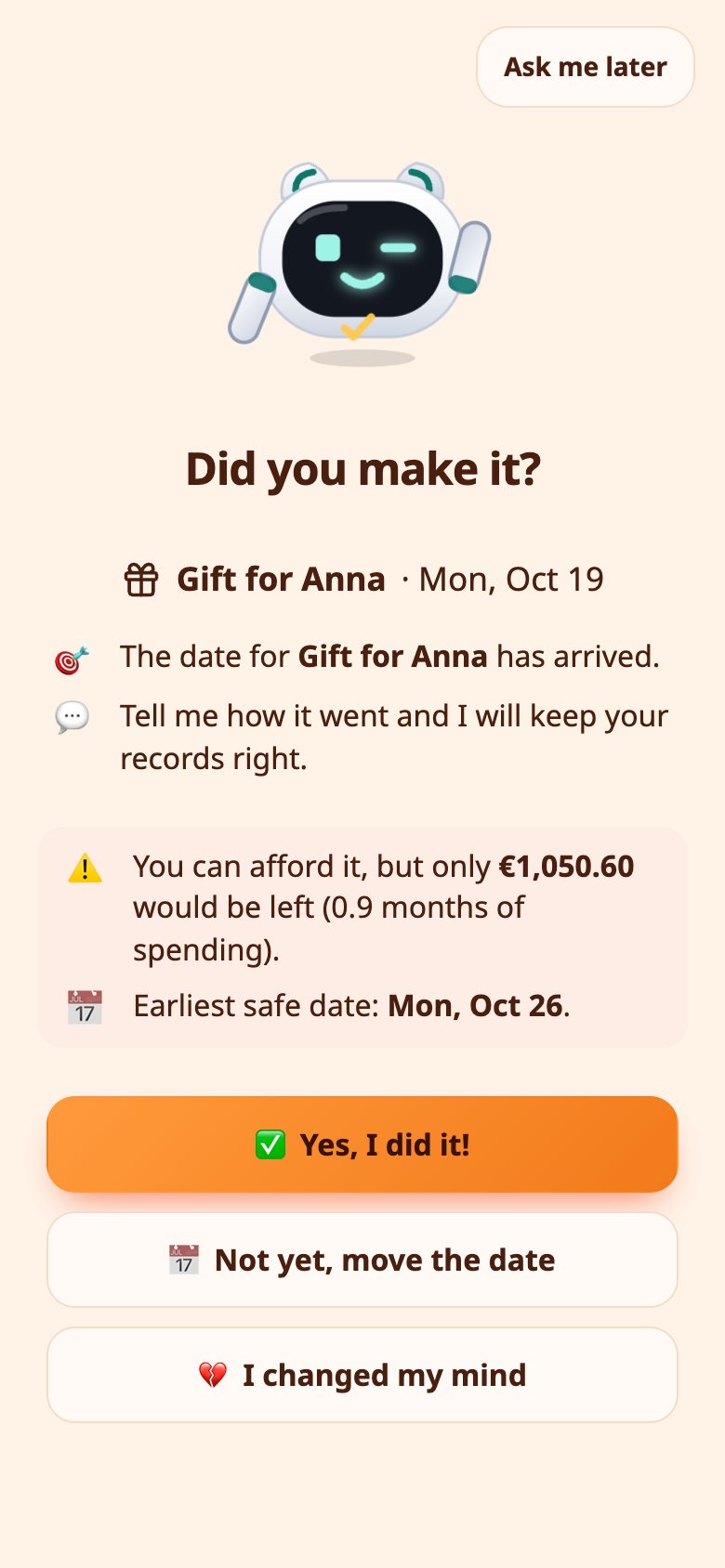
12When the date arrives: “Did you make it?”
A full-screen question, because this deserves a moment. First eFriend tells you whether you can afford it today. Then you answer.
✅Yes, I did it! It records the expense with an eFriend badge and a celebration, and adds it to What you achieved with eFriend.
📅Not yet, move the date, with the earliest safe date already filled in.
💔I changed my mind moves it to Past plans, and you can Reopen it any time.
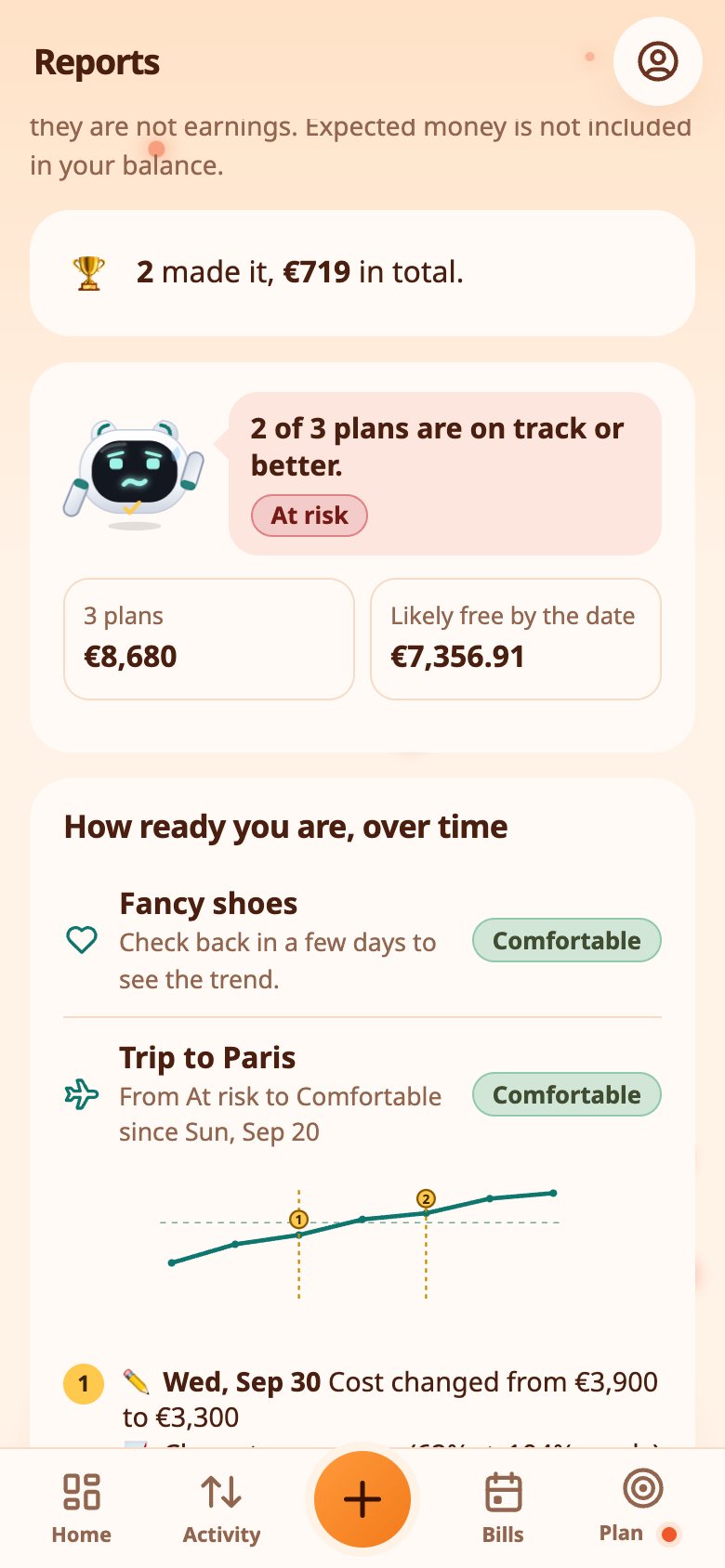
13Reports that show the journey
A new eFriend tab in Reports draws how ready you were for each plan over time. Every edit you make, a new cost, a moved date, a changed sorting, becomes a numbered gold point on the line, with a plain sentence: “Cost changed from €3,900 to €3,300: closer to your plan (62% → 104% ready).”
📉See how each decision moved you closer, or further.
🧮Your weekly spending on wants, before your first plan and since. A fair comparison, never a claim.
🏆A running total of what you made happen.
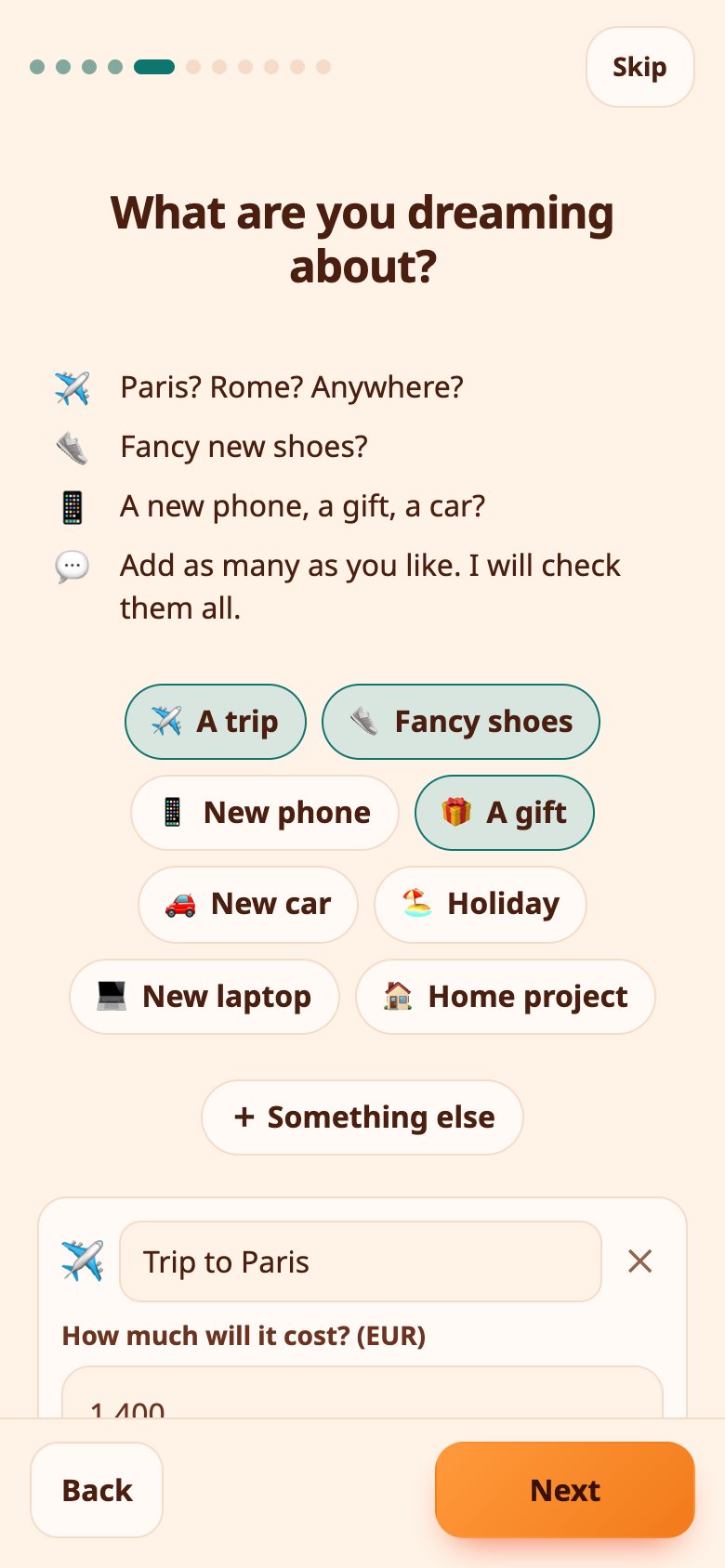
14A tour that feels like meeting someone
The first time, a full-screen tour introduces eFriend step by step. The logo’s E turns into an e, its tick into an F, and “riend” types itself out.
💶Where does your money come from? Add your salary right there, and come back to the same step.
💭What are you dreaming about? Tap a chip: a trip, shoes, a phone, a gift, a car.
🎯Budgets, priorities, and how it can help move money, with fun little animations.
🔁Missed it? Take the eFriend tour again, any time.
15A friend with a personality
The robot waves to get your attention, then waves with both hands. It blinks. Its face changes with the news. It has dozens of lines, some of them very silly (“To be or not to be… on budget?”), and they pass through its bubble one at a time, so the card never jumps around.
😊Tap it and it smiles and waves.
😆A few more taps and it giggles.
😠Poke it too much and it shakes with a low growl. (Try it in the hero above!)
🔊The sounds can be switched off with Robot sounds.
Poke me.
16A real chat before you buy
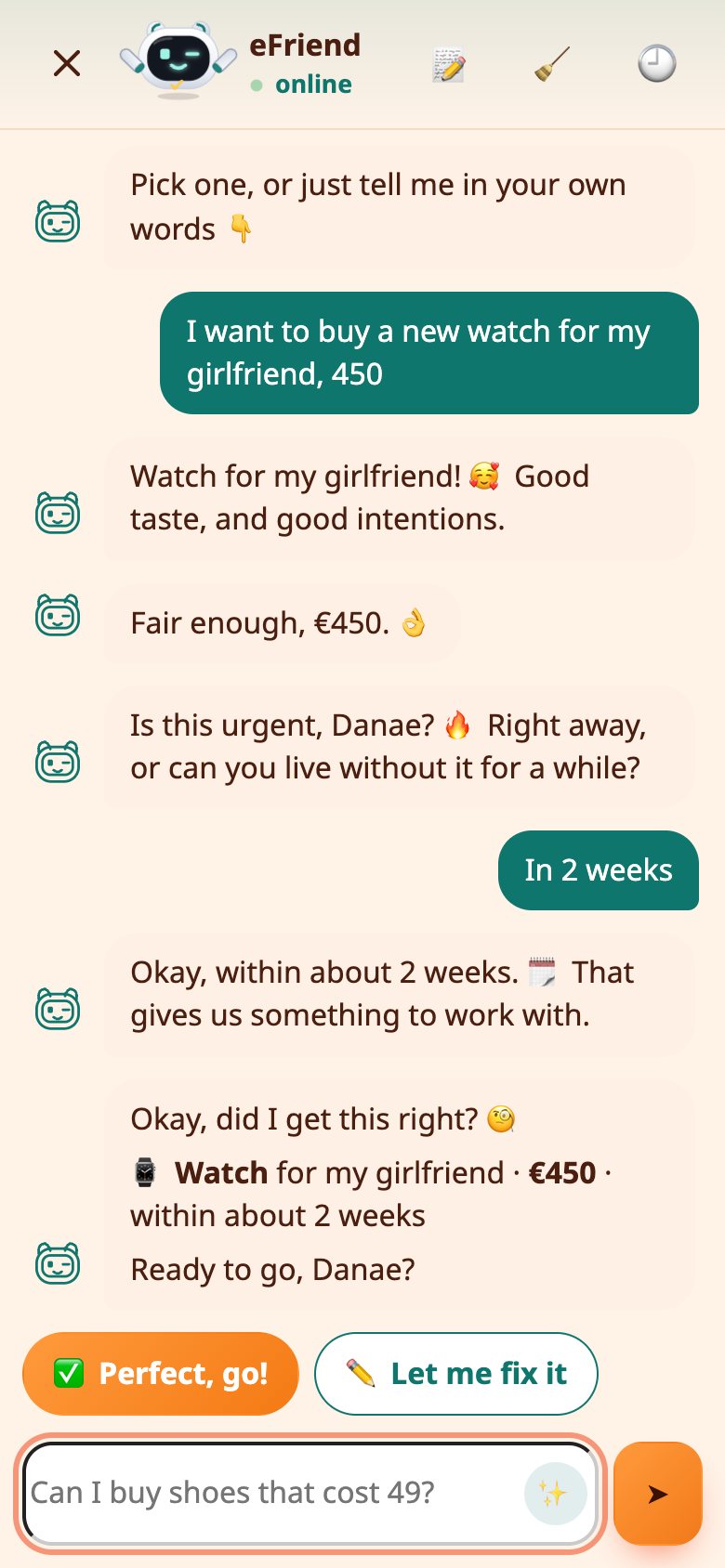
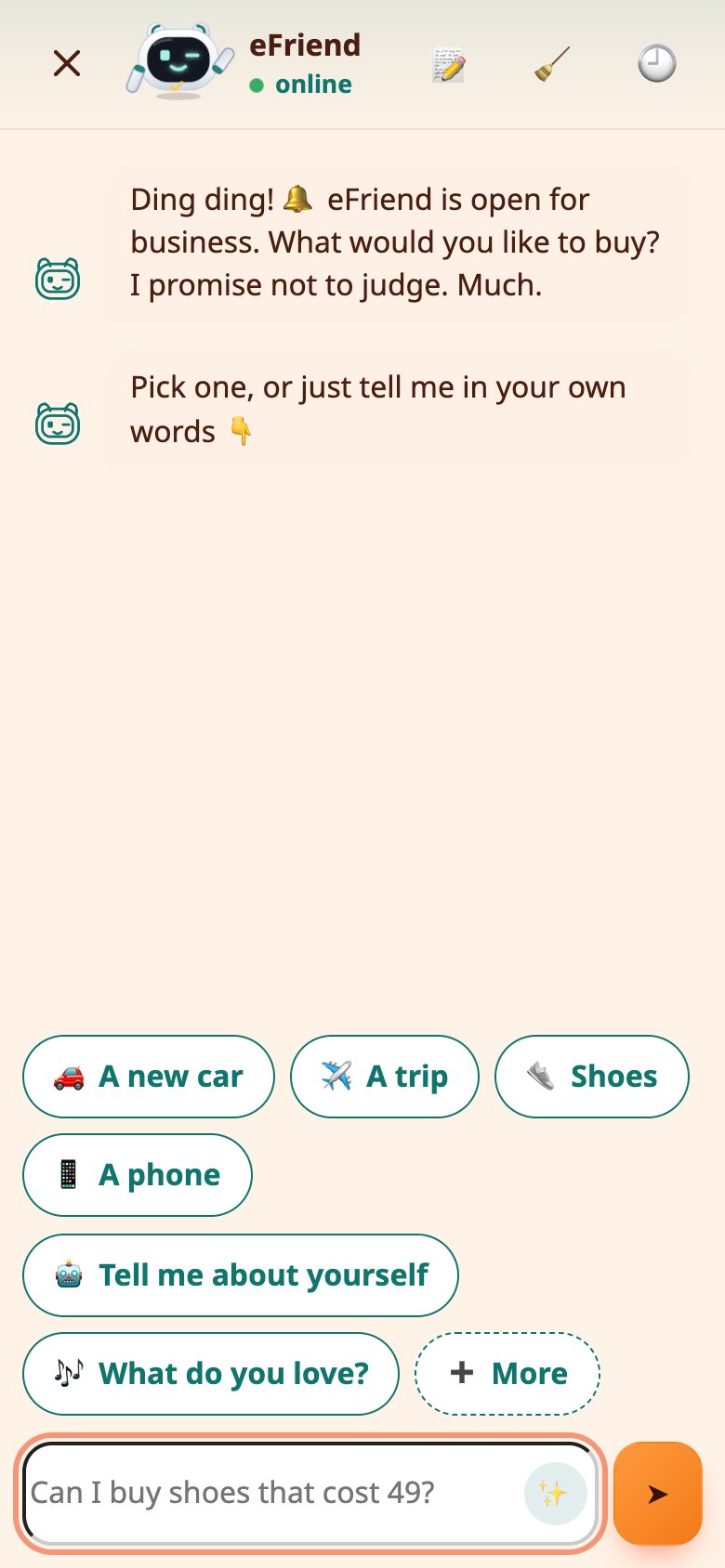
Not everything needs a plan. Sometimes you just wonder if you can buy something. Ask eFriend opens a full-page chat, and eFriend interviews you the way a friend would.
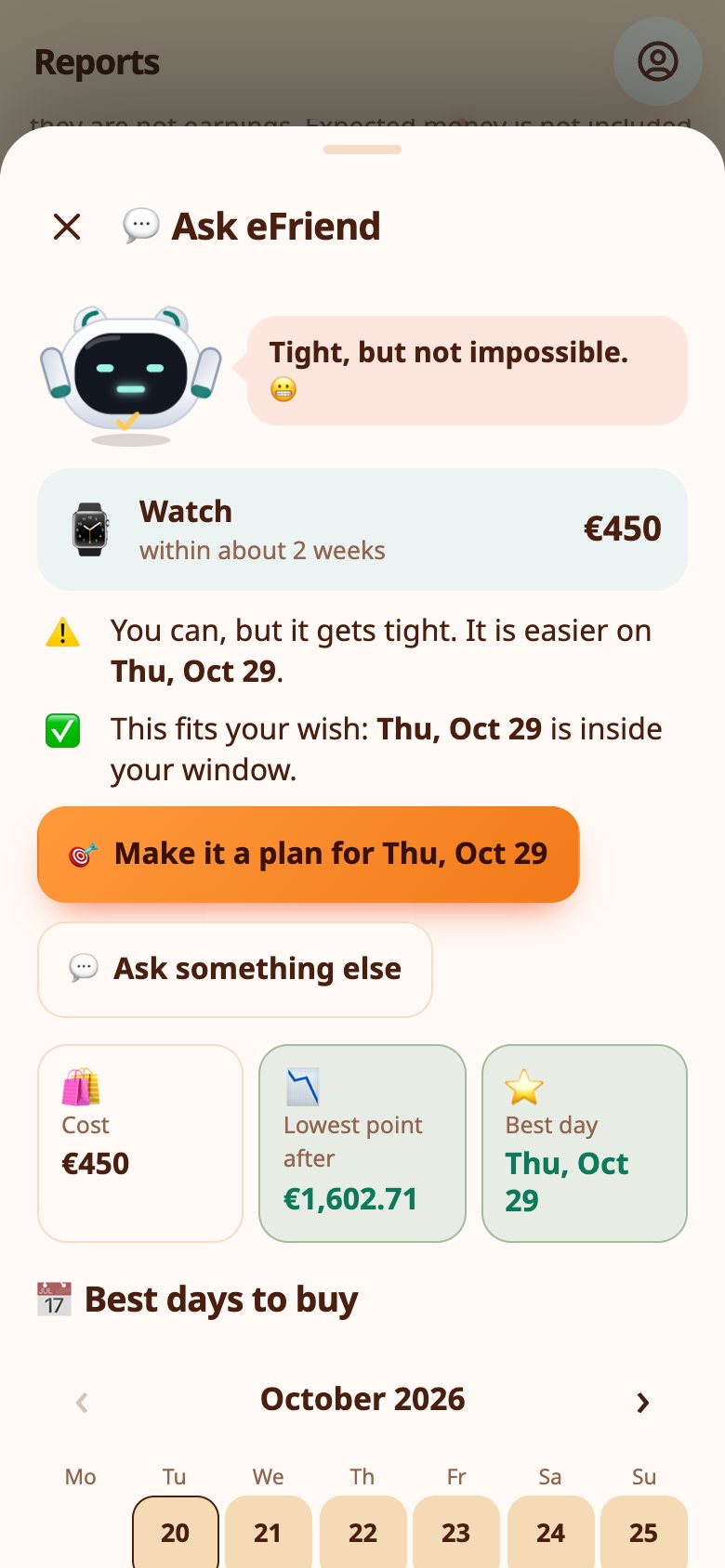
🛍️It asks what you want, how much it costs and how soon you need it. Or write it all at once: “a new watch for my girlfriend, 450, in 2 weeks”, and it only asks about what is missing.
🧐It says it back and asks if it got it right. Wrong? Type “no, it’s 1250” and it fixes it.
⌨️It types like a real person, with pauses, jokes and a different line almost every time.
🔎Then it looks at your money and brings you back to the app with the full picture.
The answer comes with a plan. It tells you if you can buy today, and finds the best day for the money.
✅Today’s answer, and how low your money would go afterwards.
🎯Make it a plan is right at the top, already filled in with the item, the price and the best date.
⭐The best day inside the time you asked for. If it does not fit, it says so and shows the earliest safe day.
🗓️No safe day in the next four months? It shows no date, and explains why instead.
17It calls you by your name
Give Expenity your name and eFriend uses it: “George, George, George… here we go again. What do you want this time?” In the greeting, the questions, the verdicts on Home. Without a name, it simply talks to you.
😄Dozens of lines in the chat alone, so it rarely says the same thing twice.
🧹Lost the thread? Start over clears the chat, and eFriend jokes about it.
🕊️Short descriptions work best, and it will tell you so.
18A calendar that opens on the best day
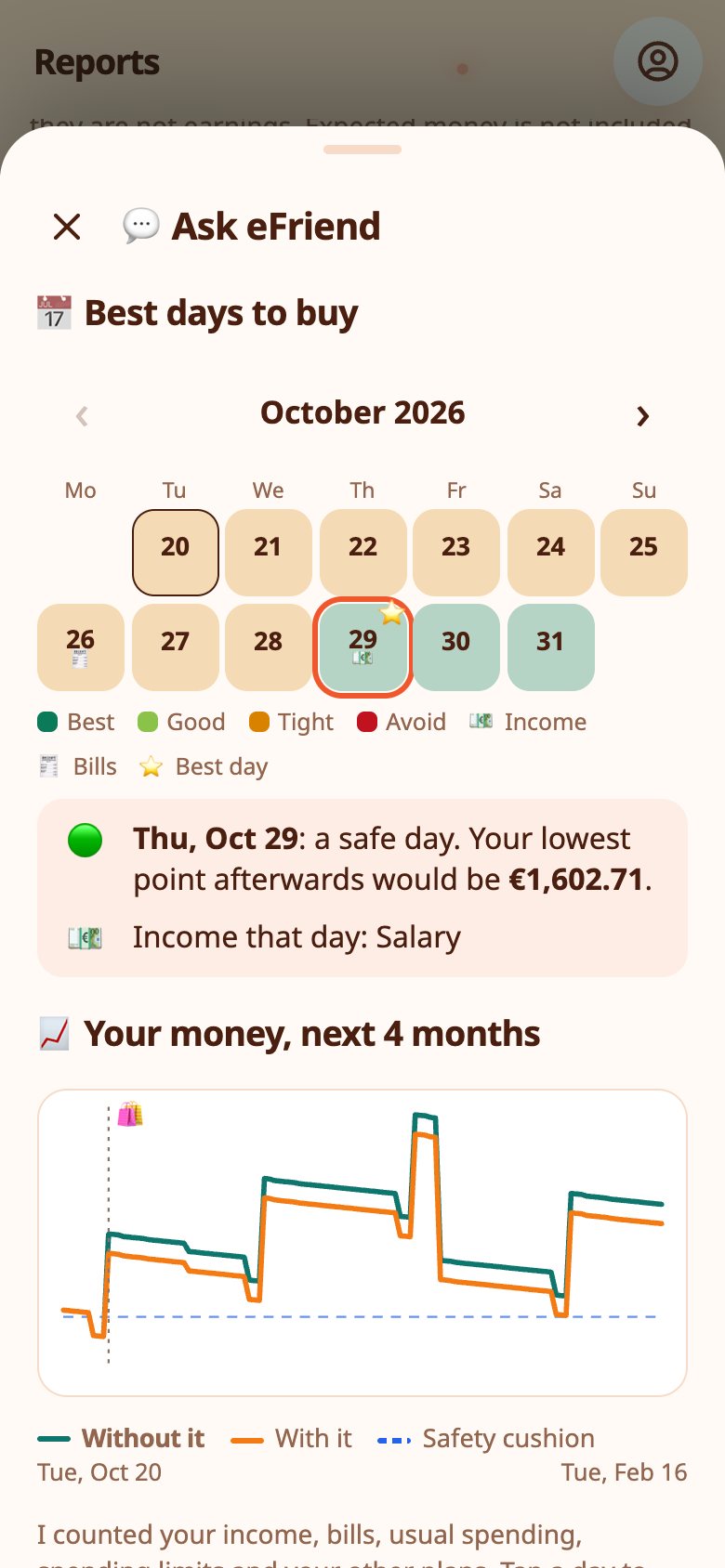
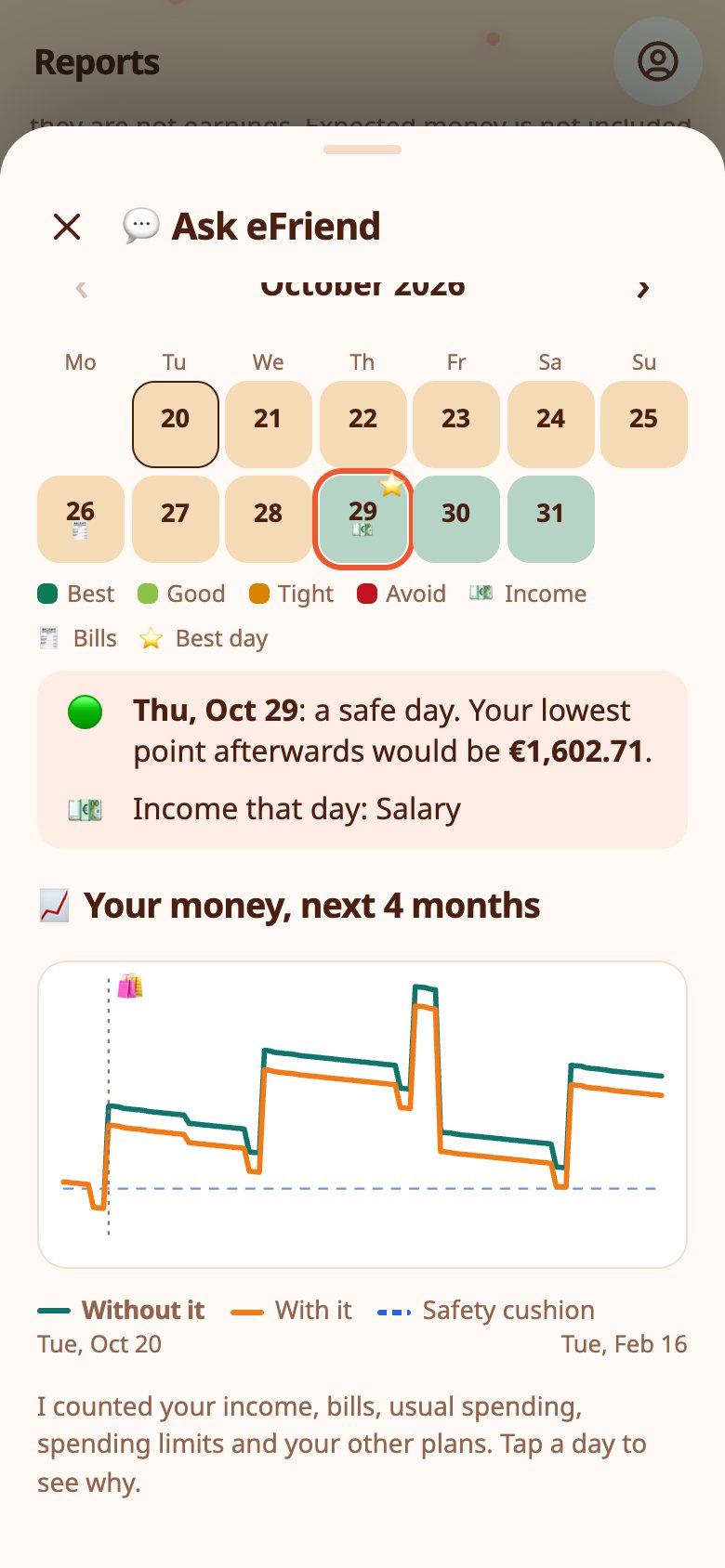
The calendar shows one month at a time, opened on the best day, with arrows to go back or forward. Colours tell you how safe each day is, and a graph shows your money with and without the purchase.
📅Best, Good, Tight, Avoid. Paydays 💶 and bills 🧾 are marked, and ⭐ shows the best day.
👆Tap any day to see why it got its colour. The plan button follows the day you pick.
📈The graph draws itself, with your safety cushion as a dotted line.
Watch the line dip, and recover. This is the same calculation eFriend uses for every plan, shown over four months.
🔵The teal line is your money without the purchase.
🟠The orange line is your money with it, from the day you pick.
🔴If it turns red, the purchase would take you below zero.
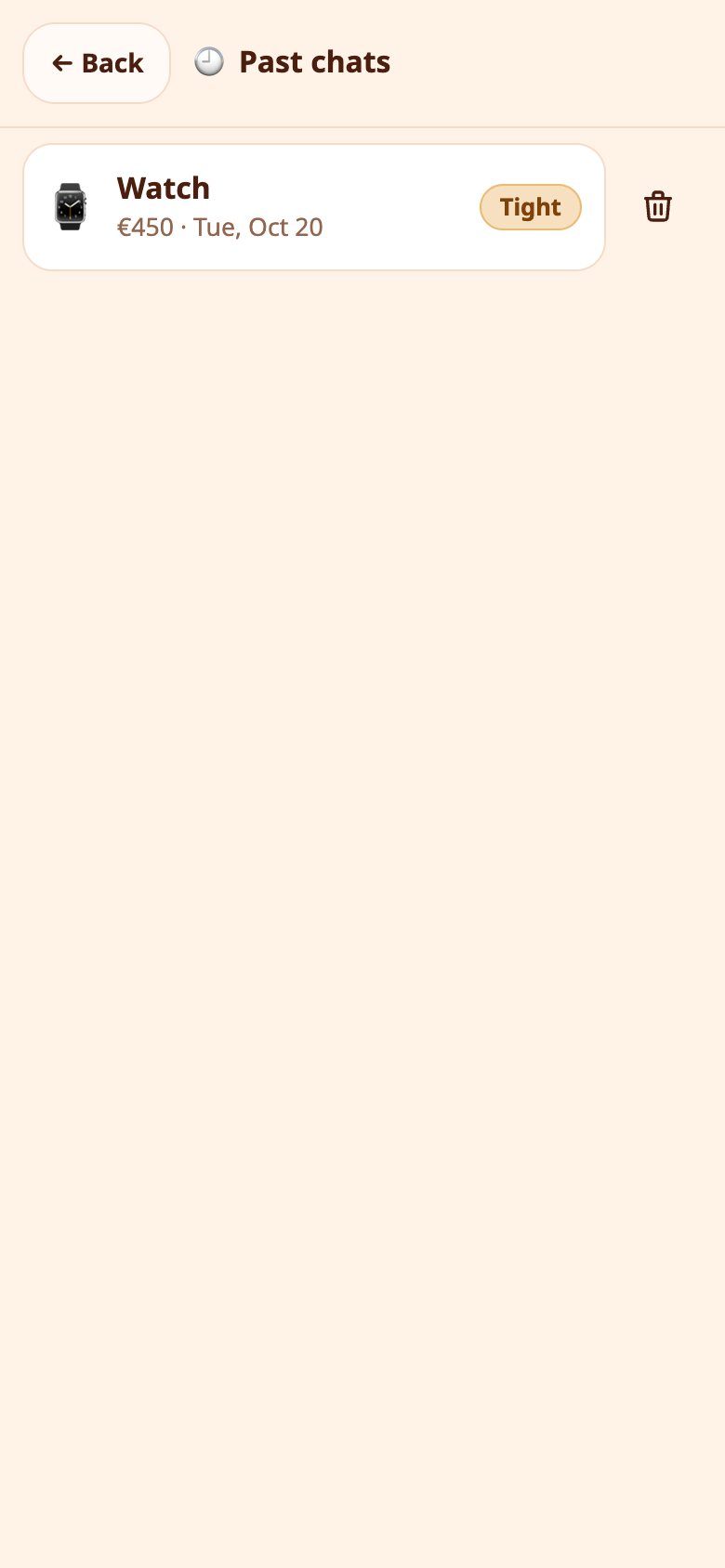
19Past chats, one tap away
Every chat is kept (the last 30), finished or not. Open one to read it again, or Ask again to check the same item with today’s numbers.
🕘Reopen any conversation from the clock at the top of the chat.
🔁Ask again brings the item, the price and the timing back, and eFriend welcomes you back with a joke.
🗑️Delete any chat you do not want to keep.
20Limits that fill themselves in
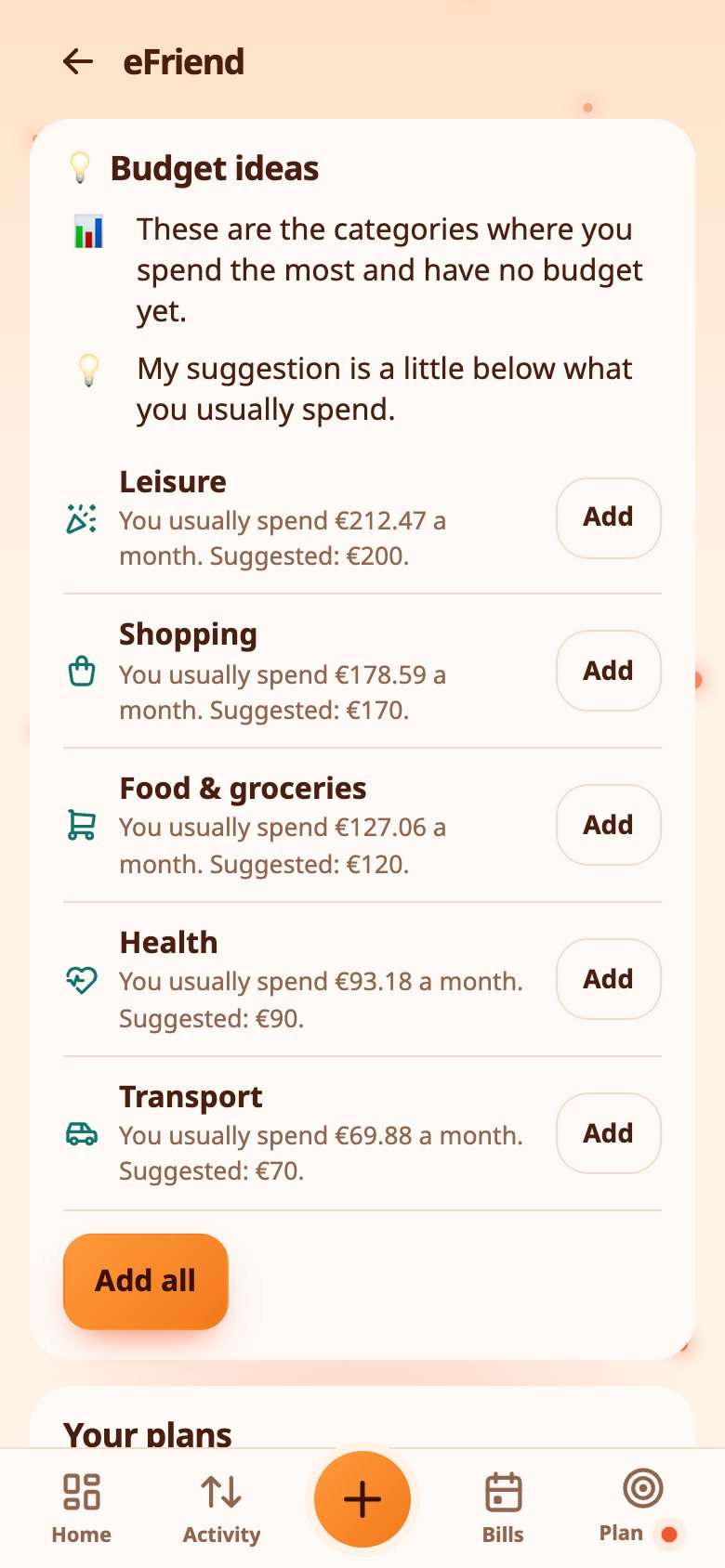
Remember “What is the most you are comfortable spending?” Now eFriend answers it for you. With two weeks of history it suggests a day, week and month limit from your real spending, bills included, a little below what you usually spend. One tap: Use this.
📈No history yet? Type one limit and eFriend fills in the other two.
✏️Always yours to change.
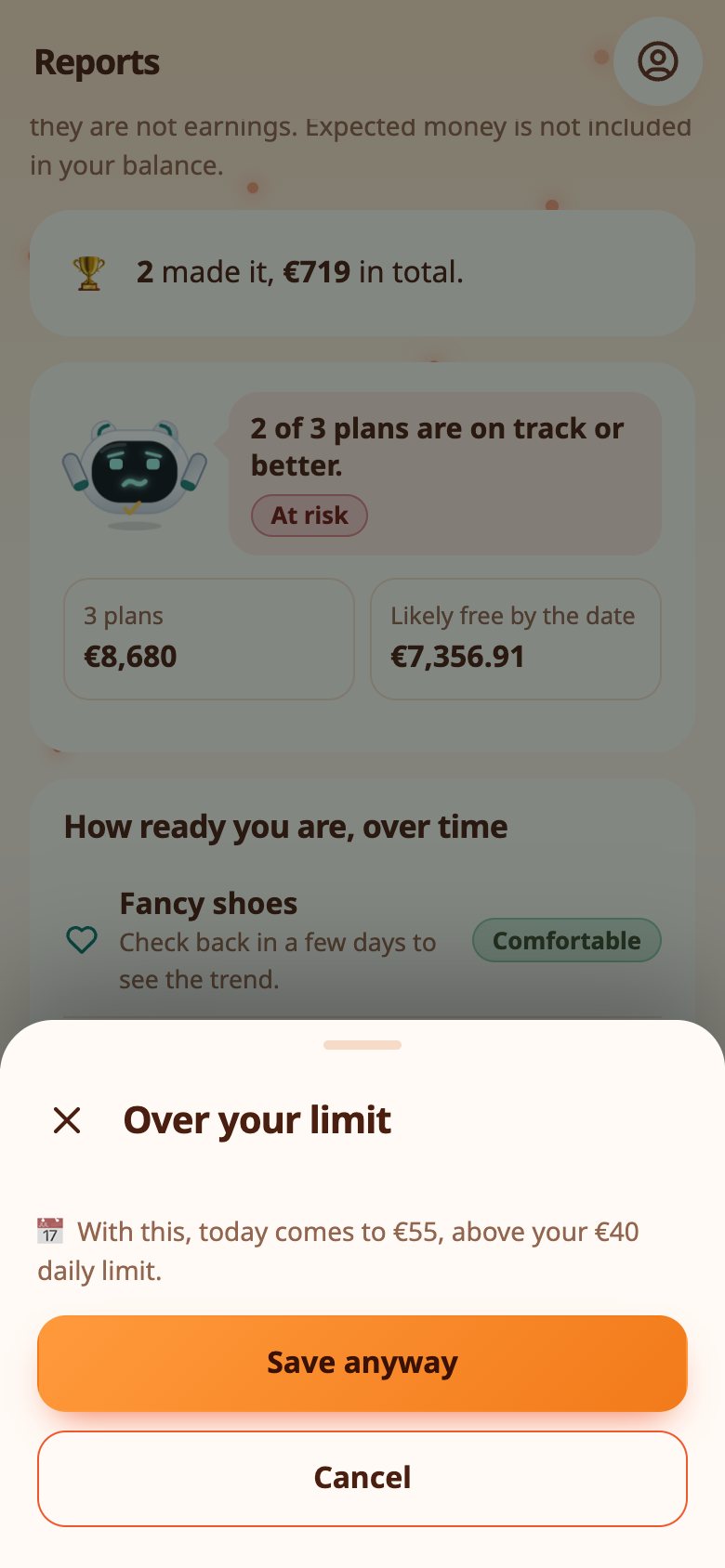
And before you save an expense that would put you over a limit, eFriend asks first. Save anyway is always one tap away.
✋A gentle note, never a blocker.
📅Day, week or month: it tells you which limit and by how much.
21A heads-up before the money runs short
If your money is likely to run out, or drop below your safety cushion, in the next two months, Home tells you the day and the payment behind it.
⚠️“Around Wed, Nov 11 your money is likely to run out.”
🧾“The big payment around then: Car insurance.”
💡“Moving that payment, or a plan, a few days later would help.”
22Budget ideas and a smarter cushion
After about six weeks, eFriend suggests budgets for the categories where you spend most and have none yet, a little below your usual. Add one, or Add all.
📊Leisure, shopping, food, health, transport: it only suggests what you really spend on.
✨Let eFriend suggest now asks if it may change only the order of your plans, or the order and the safety cushion.
If your income changes a lot from month to month, eFriend notices and suggests a bigger safety cushion, and tells you why.
🛡️“Your income changed by about 45%, so I would keep 3 months untouched.”
Try the priority list
Who comes first?
You have €4,200 to share. Reorder the plans and watch who is safe and who is at risk.
It never decides for you
🤝eFriend advises. It never drops a plan on its own.
👆In the app you press and hold a plan, then drag it. A quick swipe still scrolls.
🔁Change your mind later? The analysis updates by itself.
Private by design
Smart does not have to mean watched.
📱
It runs on your device
eFriend’s maths happens inside the app. There is no AI service behind it, no server call, no account. The same rules give the same answer every time.
🙈
Nobody sees your plans
Your plans, amounts and proposals stay in your own data. Expenity does not collect usage statistics.
🧾
Records, not transfers
Even in Automatic mode, eFriend only writes entries in your notebook. Your bank is never touched, and every automatic entry can be undone.
Start in two minutes
Say hello to eFriend.
1️⃣
Open Expenity
Use it as usual for a while. The more it sees, the better it guesses. Add your salary so it knows what is coming.
2️⃣
Meet your eFriend
Go to More → eFriend, or watch for its invitation on Home. Take the short tour and add your first wish.
3️⃣
Check back whenever
Home keeps a card for your plans. Tap it for the numbers. Everything updates on its own as your life does.
Good questions
Is eFriend free?
It is part of the Advanced plan of Expenity, which is free. You can switch eFriend on or off in More → Features.
Does it move my real money?
Never. Expenity is a tracking system. When eFriend “moves” money to a goal, it only adds an entry in your records. If you also move the money in your bank, your notebook and your bank agree.
Is it using AI?
No. It is a set of clear rules that run on your device and use your own history. That is why it is private, fast and predictable.
What if I have only used Expenity for a few days?
It still answers, and it tells you plainly that it has little history and may be rough. It also gets sharper over time, and it asks for your salary if it does not know it.
Can it drop a plan, or spend without asking?
No. It only advises. In Automatic mode it records moves to the goals you allowed, within your safety cushion, with Undo, and only after you turn that mode on.
Can I just chat with it before buying something?
Yes. Tap Ask on the Home card, open More → eFriend, or choose Ask eFriend in the + menu. It asks what you want, how much it costs and how soon, then shows the best days on a calendar. You can try it right on this page.
Does it work in Greek?
Yes, fully, with a formal, friendly tone. There is a Greek version of this page too.
Your next “can I afford it?” has an answer.
Free, private, and a little bit funny. Open Expenity and say hello.